A lot of designers do not hate resumes because they are difficult. They hate them because they are fiddly.
You can spend three hours fixing wording on a document that is supposed to explain work you already know inside out. One bullet feels weak. Another sounds inflated. Then you start moving things around, changing headings, trimming lines, and suddenly the whole task becomes a weird mix of writing, editing, and self-marketing.
That is why AI has become useful here. Not because it can replace judgment. Not because it knows your work better than you do. Just because it can help you get to a cleaner first draft faster, which is often the part that drains the most time.
For designers, that matters more than people admit. The portfolio still does the heavy lifting, whether it showcases branding projects, logo design work, website layouts, or complete visual identity systems. The resume just needs to explain what you did, what kind of work you can own, and why someone should keep reading.
Start with messy notes, not a blank page
The biggest mistake designers make with AI is asking it to create something polished before they have given it anything real.
If you feed it one vague line about “branding experience,” the result will sound like every other lifeless resume on the internet. If you feed it actual material, the output gets better fast. Job titles. Tools. Industries. Deliverables. Project scope. Results. Even rough notes are useful.
That is why the smart move is to gather the raw material first. Pull together your current resume, a couple of job descriptions you would actually apply to, and a short list of projects that show the work you want to keep doing. Then you have something worth shaping.
If you already have the raw material, a tool like Resumatic can speed up the part that usually drags: turning rough notes, job history, and project details into a draft that is actually workable. For designers, that is often the real win. You are not looking for a tool to tell your story for you. You just want to get to a solid version faster so you can spend your time fixing what still needs your judgment.
 Source
A better input set usually includes:
- your current resume, even if it is rough
- two or three recent job descriptions
- a list of the tools you actually use
- three projects with specific deliverables
- one sentence about the kind of role you want next
That prep does not sound exciting, but it changes the quality of the result. A line like “worked on launch assets” can become “designed paid social, landing page, and email visuals for a three-week product launch using Figma and Illustrator” once the details are there. Now a hiring manager can picture the work instead of guessing.
That same instinct shows up in DesignCrowd’s advice on creating an impressive graphic design portfolio. Good portfolios are curated and specific. The same rule helps resumes. The clearer the source material, the less generic the final document feels.
Let AI tighten the writing, not take over your voice
The useful part of AI is not that it writes for you. It is that it helps you stop circling the same sentence for forty minutes.
A lot of resume writing is repetitive work. You are trimming bloated lines, turning vague tasks into stronger bullets, swapping weak verbs for better ones, and matching your wording to the role in front of you. AI is good at that kind of first-pass cleanup.
Where people get into trouble is letting it drift too far. Designers are especially vulnerable here because they often know when something looks polished before they notice that it sounds hollow. A resume can read smoothly and still say almost nothing.
The safest use case is narrow. Ask AI to rewrite a bullet more clearly. Ask it for three tighter versions of a summary. Ask it to pull out the repeated themes from a job description. Ask it to shorten a paragraph without flattening the meaning. That is very different from asking it to generate your whole professional identity in one shot.
For example, “Worked on social media and branding materials for multiple clients” is technically fine, but it is doing very little. A stronger version might read: “Created logo concepts, social templates, and pitch deck visuals for 12 client accounts across retail, food, and wellness.” That sounds better because it is more concrete, not because it is fancier.
That is also why restraint matters. If every bullet suddenly sounds like it was written by a management consultant, you have gone too far. The best resume line is usually the one that sounds like a clear version of how you would describe the work out loud.
That matters for screening too. In MIT’s ATS guidance, the focus stays on readable structure, standard section headings, and wording a system can parse properly. That is boring advice, but it is good advice. A recruiter should not have to decode your layout before they understand your experience.
One easy check helps here: read the bullet aloud. If it sounds stiff, inflated, or unlike you, rewrite it. AI can get you to a decent draft. It cannot tell when you have stopped sounding human. An AI humanizer can help soften overly mechanical phrasing, although every line should still be reviewed to ensure it reflects your real voice and experience.
Use AI to tailor faster, not to rebuild from scratch every time
Most designers are not applying to one neat category of job anymore.
You might go after an in-house brand role, a marketing design opening, and a freelance packaging brief in the same week. Those are not identical jobs, even if the same person could do all three well. The work history may stay mostly the same, but the emphasis should change.
That is one of the few places where AI saves real time. You do not need to write three resumes from zero. You need one strong base version and a faster way to shift the focus depending on the role.
Say you are applying to these three positions:
- a startup looking for a brand designer
- a SaaS company hiring a marketing designer
- a food company needing freelance packaging support
The startup resume should push identity systems, launches, and visual consistency closer to the top. The SaaS version should bring campaign assets, landing pages, an image enhancer, and email work forward. The packaging version should make print specs, labeling, and product mockups easier to spot.
That is not dishonesty. It is editing. You are making the relevant parts easier to find.
This is where AI is genuinely practical. Paste in the job description, review the phrasing, rewrite your summary, and adjust your top bullets to match the role. That is much faster than staring at the same file and trying to remember which lines matter most for which employer.
The logic matches what HubSpot says about ATS-friendly resumes: relevance and readability do more work than decorative formatting. That should be reassuring for designers, because the resume does not have to be the most visually expressive document in your application. It just has to be clear and useful.
This is also why the topic fits DesignCrowd’s audience better than it might seem at first. Designers move between full-time roles, freelance work, and project-based gigs all the time. Their article on building a successful career in freelance graphic design leans into that reality. Once your career is a mix of opportunities instead of one straight line, faster tailoring stops being a nice extra and starts being part of the job. As freelance work grows, using AI contract management software can also help designers organize client agreements, track contract terms, and reduce the administrative work that comes with managing multiple projects.
A simple working setup looks like this:
- keep one master resume with your strongest bullets
- save two or three versions for your most common role types
- use AI to adjust the summary and top experience points
- edit the language yourself before exporting
That last part matters. Faster is the point. Hands-off is not.
Keep the resume calm and let the portfolio do the showing off
Designers know how to make documents look good. That can help. It can also get in the way.
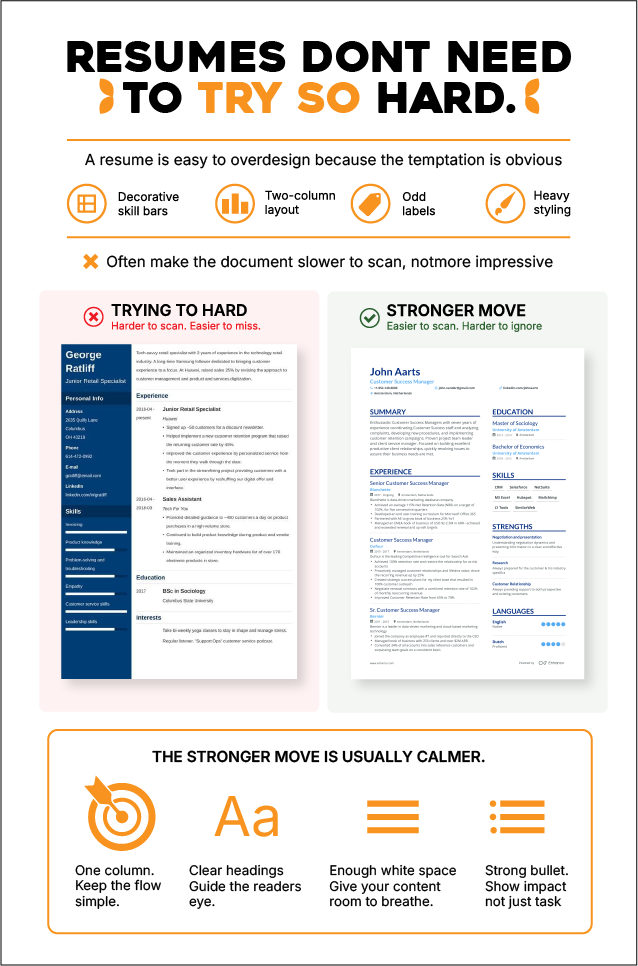
A resume is easy to overdesign because the temptation is obvious. You want it to feel branded, thoughtful, and visually sharp. But many creative resumes get worse as soon as they start trying too hard. Two-column layouts, decorative skill bars, odd labels, and heavy styling often make the document slower to scan, not more impressive.
The stronger move is usually calmer. One column. Clear headings. Enough white space. Strong bullets. Nothing cute. Nothing that asks the reader to solve a puzzle before they know what you have done.
That does not mean designers should stop caring about presentation. It just means the portfolio should carry more of that visual burden. The resume is there to answer practical questions quickly. What kind of work have you done? What tools do you know? What industries have you worked in? What kind of role makes sense next?
That split usually makes the whole application feel better. The portfolio shows taste. The resume shows fit.
One useful test is brutal but effective: hand the resume to a friend for 20 seconds. Then ask what kind of designer you seem to be. If they cannot answer clearly, the design is not helping enough, or it is doing too much.
Wrap-up takeaway
Designers do not need AI to make their resumes sound smarter. They need it to make the process less slow, less repetitive, and less irritating. That is the real advantage. You still have to decide what belongs, what sounds true, and what kind of work you want to be hired for.
The strongest version of this workflow is pretty simple. Gather better raw material, use AI to clean up the draft, tailor it for the job in front of you, and keep the design restrained enough that the writing can do its job. Open one real job post today, rebuild your top five bullets around that role, and leave the font tweaking for later.
Written by DesignCrowd on Thursday, June 11, 2026
DesignCrowd is an online marketplace providing logo, website, print and graphic design services by providing access to freelance graphic designers and design studios around the world.
